No Image

Замена зажигания кнопок громкости и питания Huawei Ascend G610

42 просмотров
17 декабря 2023

Введение

Замена ленточного кабеля кнопок громкости и питания

Шаг 1 Кнопки громкости и питания

Huawei Ascend G610 volume and power buttons replacement ignition, Volume and power buttons: step 1, image 1 of 1

Снимите заднюю крышку.

Шаг 2

Huawei Ascend G610 volume and power buttons replacement ignition: step 2, image 1 of 1

Извлеките аккумулятор.

Шаг 3

Huawei Ascend G610 volume and power buttons replacement ignition: step 3, image 1 of 1

С помощью крестовой отвертки открутите девять боковых винтов, один из них находится под клеем, который необходимо удалить

Выкрутите 10-й винт, он короче, находится посередине рядом со слотом для Sim-карты.

Шаг 4

Huawei Ascend G610 volume and power buttons replacement ignition: step 4, image 1 of 2Huawei Ascend G610 volume and power buttons replacement ignition: step 4, image 2 of 2

С помощью тонкого инструмента подденьте шарниры и снимите центральную часть корпуса.

Шаг 5

Huawei Ascend G610 volume and power buttons replacement ignition: step 5, image 1 of 1

Отсоедините разъем дисплея.

Шаг 6

Huawei Ascend G610 volume and power buttons replacement ignition: step 6, image 1 of 1

Отсоедините разъем датчика освещенности.

Шаг 7

Huawei Ascend G610 volume and power buttons replacement ignition: step 7, image 1 of 1

Отсоедините разъем сенсорного экрана.

Шаг 8

Huawei Ascend G610 volume and power buttons replacement ignition: step 8, image 1 of 1

Подденьте разъем между двумя платами.

Шаг 9

Huawei Ascend G610 volume and power buttons replacement ignition: step 9, image 1 of 3Huawei Ascend G610 volume and power buttons replacement ignition: step 9, image 2 of 3Huawei Ascend G610 volume and power buttons replacement ignition: step 9, image 3 of 3

С помощью тонкого инструмента отсоедините материнскую плату от соединений

Шаг 10

Huawei Ascend G610 volume and power buttons replacement ignition: step 10, image 1 of 1

Извлеките материнскую плату

Шаг 11

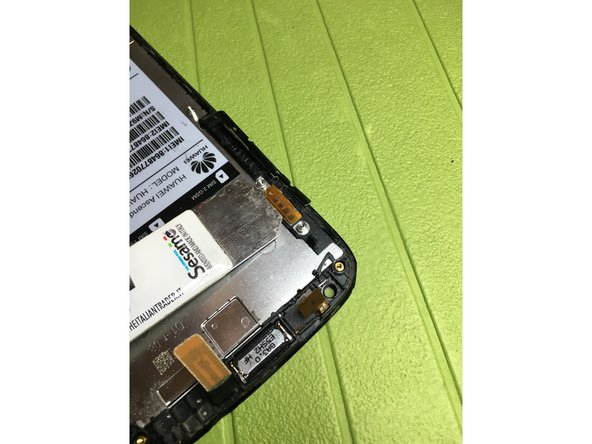
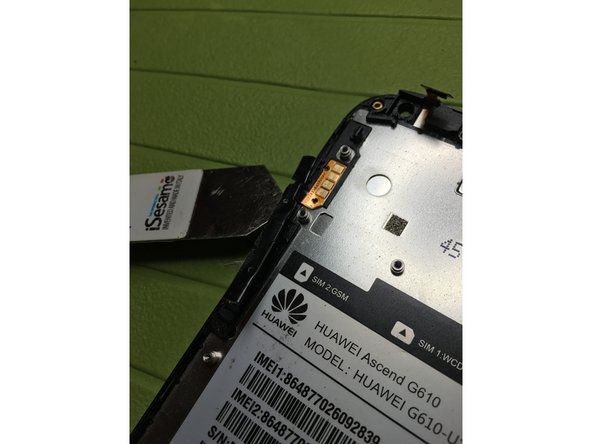
Huawei Ascend G610 volume and power buttons replacement ignition: step 11, image 1 of 3Huawei Ascend G610 volume and power buttons replacement ignition: step 11, image 2 of 3Huawei Ascend G610 volume and power buttons replacement ignition: step 11, image 3 of 3

С помощью источника тепла отсоедините ленточный кабель аудио и кнопки питания

Шаг 12

Huawei Ascend G610 volume and power buttons replacement ignition: step 12, image 1 of 1

Замените новым компонентом

Комментировать
42 просмотров
Комментариев нет, будьте первым кто его оставит

Это интересно
No Image Гайды
0 комментариев
No Image Гайды
0 комментариев
No Image Гайды
0 комментариев