No Image

Замена вентилятора Dell Vostro 3400

76 просмотров
12 декабря 2023

Шаг 1 Вентилятор

Dell Vostro 3400 Fan Replacement, Fan: step 1, image 1 of 3Dell Vostro 3400 Fan Replacement, Fan: step 1, image 2 of 3Dell Vostro 3400 Fan Replacement, Fan: step 1, image 3 of 3

Выкрутите девять винтов, удерживающих заднюю панель на месте, с помощью отвертки Phillips #00.

Шаг 2

Dell Vostro 3400 Fan Replacement: step 2, image 1 of 3Dell Vostro 3400 Fan Replacement: step 2, image 2 of 3Dell Vostro 3400 Fan Replacement: step 2, image 3 of 3

Откройте заднюю панель с помощью пробки.

Шаг 3

Dell Vostro 3400 Fan Replacement: step 3, image 1 of 3Dell Vostro 3400 Fan Replacement: step 3, image 2 of 3Dell Vostro 3400 Fan Replacement: step 3, image 3 of 3

Отверткой Phillips #00 выкрутите два винта, удерживающих вентилятор на месте.

Шаг 4

Dell Vostro 3400 Fan Replacement: step 4, image 1 of 3Dell Vostro 3400 Fan Replacement: step 4, image 2 of 3Dell Vostro 3400 Fan Replacement: step 4, image 3 of 3

Отсоедините коричневый провод, намотанный на вентилятор, с помощью пинцета.

Шаг 5

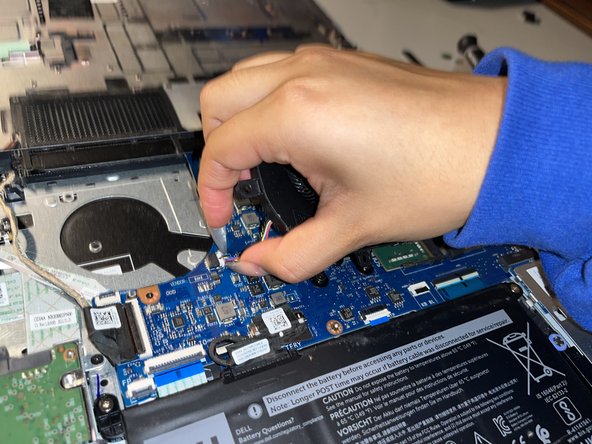
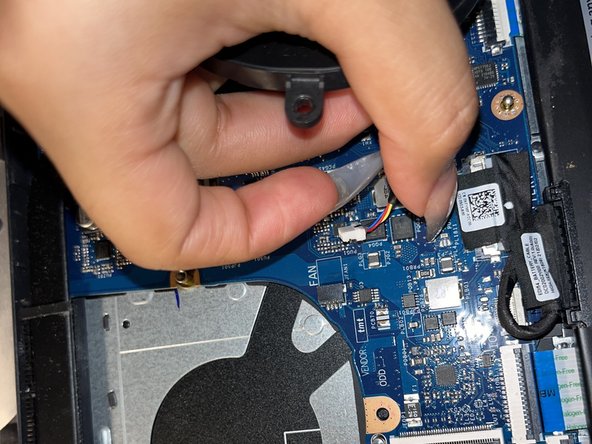
Dell Vostro 3400 Fan Replacement: step 5, image 1 of 3Dell Vostro 3400 Fan Replacement: step 5, image 2 of 3Dell Vostro 3400 Fan Replacement: step 5, image 3 of 3

Вытащите соединение между вентилятором и материнской платой.

Шаг 6

Dell Vostro 3400 Fan Replacement: step 6, image 1 of 1

Извлеките вентилятор из ноутбука.

Комментировать
76 просмотров
Комментариев нет, будьте первым кто его оставит

Это интересно