No Image

Замена двигателя и печатной платы циклонического пылесоса Bissell OptiClean

СОДЕРЖАНИЕ
88 просмотров
08 декабря 2023

Введение

Моторы могут ломаться или засоряться со временем, и их необходимо заменять или снимать для чистки. В этом руководстве вы узнаете, как снять двигатель и печатную плату.

Шаг 1 Гибкий шланг с ручкой

Bissell OptiClean Cyclonic Vacuum Motor and Circuit Board Replacement, Flex Hose with Handle: step 1, image 1 of 2Bissell OptiClean Cyclonic Vacuum Motor and Circuit Board Replacement, Flex Hose with Handle: step 1, image 2 of 2

Возьмитесь за ручку гибкого шланга и удлинительную палочку.

Потяните прямо, чтобы отсоединить ручку от удлинителя.

Шаг 2

Bissell OptiClean Cyclonic Vacuum Motor and Circuit Board Replacement: step 2, image 1 of 1

Найдите стопорный зажим на другом конце гибкого шланга.

Шаг 3

Bissell OptiClean Cyclonic Vacuum Motor and Circuit Board Replacement: step 3, image 1 of 2Bissell OptiClean Cyclonic Vacuum Motor and Circuit Board Replacement: step 3, image 2 of 2

Удерживайте зажим, чтобы отсоединить гибкий шланг от пылесоса.

Снимите гибкий шланг с пылесоса.

Шаг 4 Фильтры

Bissell OptiClean Cyclonic Vacuum Motor and Circuit Board Replacement, Filters: step 4, image 1 of 3Bissell OptiClean Cyclonic Vacuum Motor and Circuit Board Replacement, Filters: step 4, image 2 of 3Bissell OptiClean Cyclonic Vacuum Motor and Circuit Board Replacement, Filters: step 4, image 3 of 3

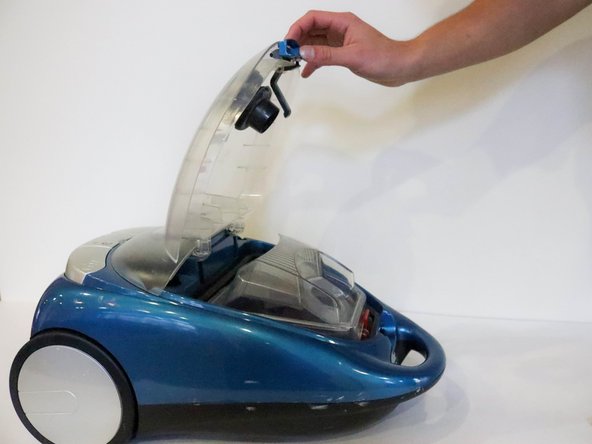
После снятия шланга положите пылесос на спину и отстегните верхний отсек.

Откройте отсек.

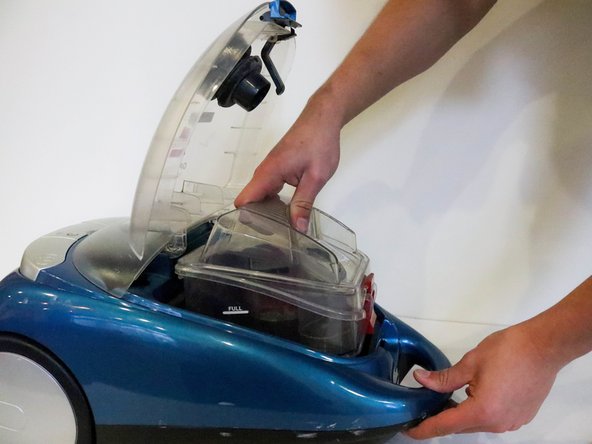
Извлеките из пылесоса коробку для сбора грязи.

Шаг 5

Bissell OptiClean Cyclonic Vacuum Motor and Circuit Board Replacement: step 5, image 1 of 3Bissell OptiClean Cyclonic Vacuum Motor and Circuit Board Replacement: step 5, image 2 of 3Bissell OptiClean Cyclonic Vacuum Motor and Circuit Board Replacement: step 5, image 3 of 3

Отложите коробку для сбора грязи в сторону.

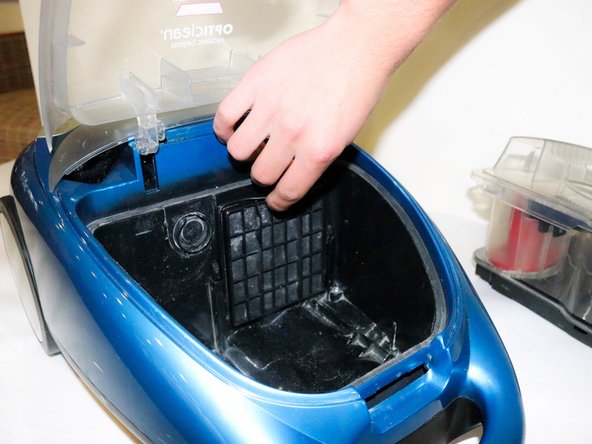
Найдите фильтр предварительной очистки двигателя.

Вытащите фильтр, взявшись за выступ сверху.

Шаг 6

Bissell OptiClean Cyclonic Vacuum Motor and Circuit Board Replacement: step 6, image 1 of 3Bissell OptiClean Cyclonic Vacuum Motor and Circuit Board Replacement: step 6, image 2 of 3Bissell OptiClean Cyclonic Vacuum Motor and Circuit Board Replacement: step 6, image 3 of 3

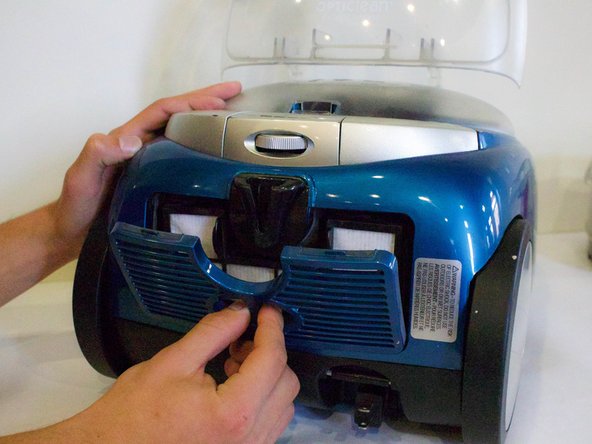
Переверните пылесос и найдите крышку фильтра в нижней части.

Вставьте пальцы в отверстие и снимите крышку фильтра.

Поместите пальцы на каждый выступ на постмоторном фильтре HEPA Media и вытащите его.

Шаг 7

Bissell OptiClean Cyclonic Vacuum Motor and Circuit Board Replacement: step 7, image 1 of 3Bissell OptiClean Cyclonic Vacuum Motor and Circuit Board Replacement: step 7, image 2 of 3Bissell OptiClean Cyclonic Vacuum Motor and Circuit Board Replacement: step 7, image 3 of 3

Выньте фильтр для очистки или замены.

Чтобы очистить ящик для сбора грязи, отстегните крышку и снимите ее.

Шаг 8

Bissell OptiClean Cyclonic Vacuum Motor and Circuit Board Replacement: step 8, image 1 of 3Bissell OptiClean Cyclonic Vacuum Motor and Circuit Board Replacement: step 8, image 2 of 3Bissell OptiClean Cyclonic Vacuum Motor and Circuit Board Replacement: step 8, image 3 of 3

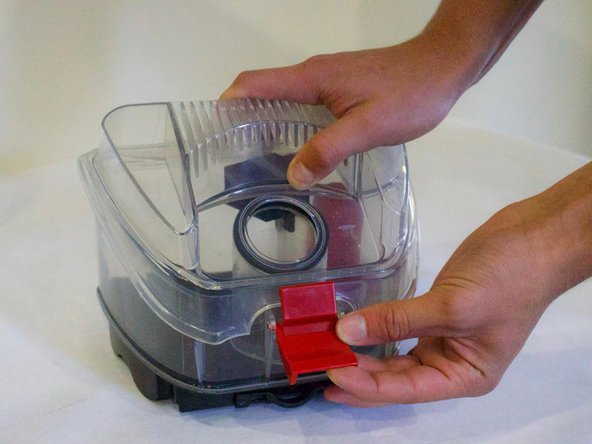
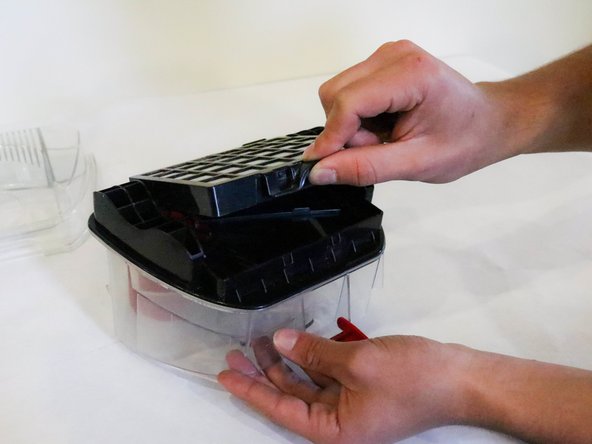
Переверните контейнер для сбора грязи и найдите нажимной язычок.

Поднимите фильтр HEPA Media Dirt Cup вверх, чтобы снять его.

На рисунке 3 показаны все фильтры, извлеченные из пылесоса.

Шаг 9 Двигатель и печатная плата

Bissell OptiClean Cyclonic Vacuum Motor and Circuit Board Replacement, Motor and Circuit Board: step 9, image 1 of 2Bissell OptiClean Cyclonic Vacuum Motor and Circuit Board Replacement, Motor and Circuit Board: step 9, image 2 of 2

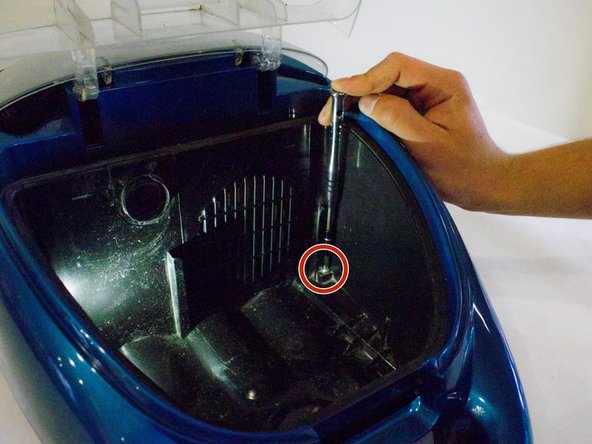
Открутите два винта под коробкой для сбора грязи внутри пылесоса.

Шаг 10

Bissell OptiClean Cyclonic Vacuum Motor and Circuit Board Replacement: step 10, image 1 of 1

Переверните пылесос.

Шаг 11

Bissell OptiClean Cyclonic Vacuum Motor and Circuit Board Replacement: step 11, image 1 of 2Bissell OptiClean Cyclonic Vacuum Motor and Circuit Board Replacement: step 11, image 2 of 2

Открутите оба винта в нижней части ручки.

Шаг 12

Bissell OptiClean Cyclonic Vacuum Motor and Circuit Board Replacement: step 12, image 1 of 2Bissell OptiClean Cyclonic Vacuum Motor and Circuit Board Replacement: step 12, image 2 of 2

Открутите оба винта возле колес.

Шаг 13

Bissell OptiClean Cyclonic Vacuum Motor and Circuit Board Replacement: step 13, image 1 of 3Bissell OptiClean Cyclonic Vacuum Motor and Circuit Board Replacement: step 13, image 2 of 3Bissell OptiClean Cyclonic Vacuum Motor and Circuit Board Replacement: step 13, image 3 of 3

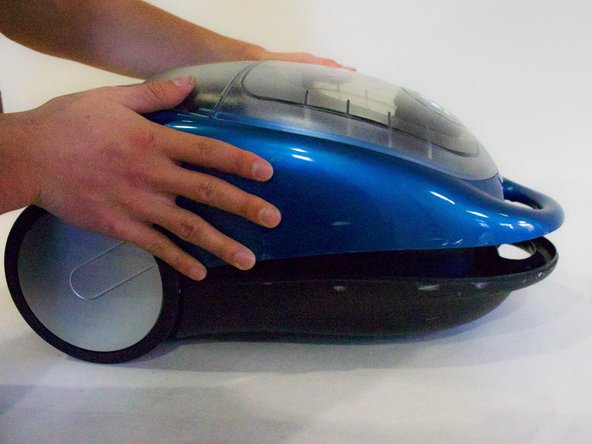
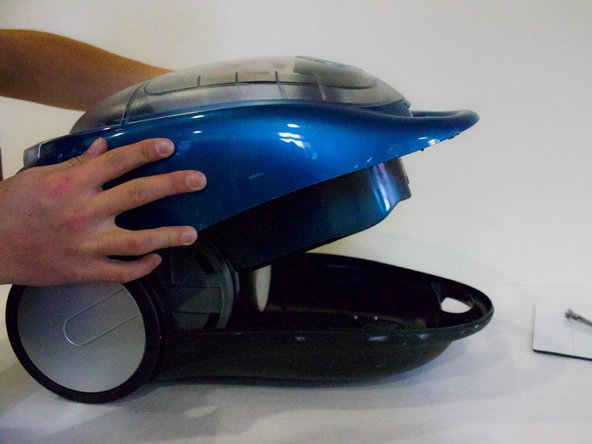
Переверните пылесос.

Аккуратно снимите верхнюю часть.

Не пытайтесь снять ее полностью. К корпусу все еще прикреплены провода.

Шаг 14

Bissell OptiClean Cyclonic Vacuum Motor and Circuit Board Replacement: step 14, image 1 of 2Bissell OptiClean Cyclonic Vacuum Motor and Circuit Board Replacement: step 14, image 2 of 2

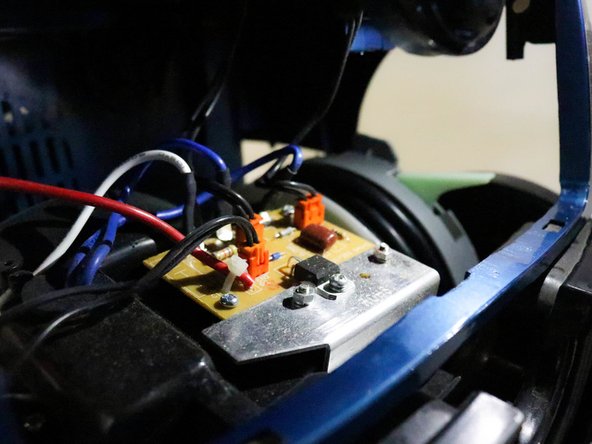
Найдите печатную плату.

Шаг 15

Bissell OptiClean Cyclonic Vacuum Motor and Circuit Board Replacement: step 15, image 1 of 3Bissell OptiClean Cyclonic Vacuum Motor and Circuit Board Replacement: step 15, image 2 of 3Bissell OptiClean Cyclonic Vacuum Motor and Circuit Board Replacement: step 15, image 3 of 3

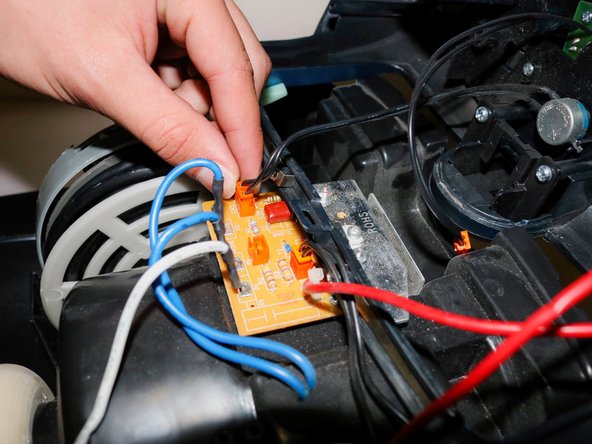
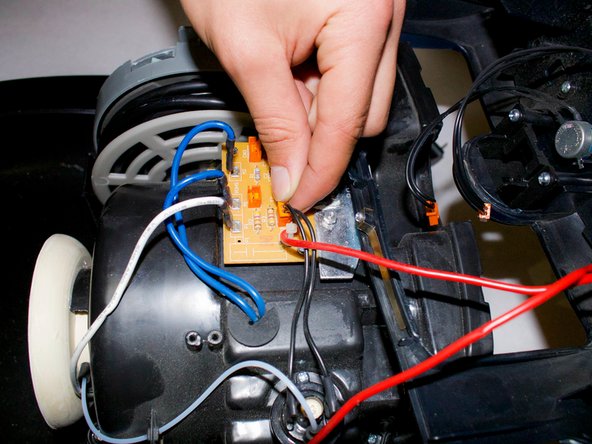
Отсоедините каждый оранжевый штекер.

Убедитесь, что вы запомнили, какой оранжевый штекер куда подключен!

Шаг 16

Bissell OptiClean Cyclonic Vacuum Motor and Circuit Board Replacement: step 16, image 1 of 2Bissell OptiClean Cyclonic Vacuum Motor and Circuit Board Replacement: step 16, image 2 of 2

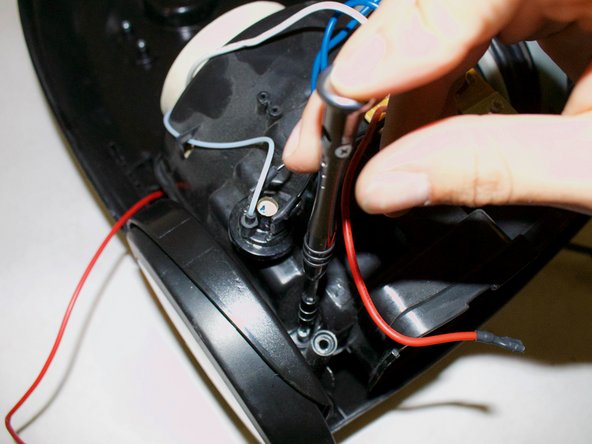
Отсоедините красные провода. Провода может быть немного сложно снять. Если это так, вы можете использовать плоскогубцы, чтобы отсоединить провода.

Не дергайте провода, так как это может привести к поломке металла, удерживающего их.

Шаг 17

Bissell OptiClean Cyclonic Vacuum Motor and Circuit Board Replacement: step 17, image 1 of 1

Снимите верхнюю часть.

Шаг 18

Bissell OptiClean Cyclonic Vacuum Motor and Circuit Board Replacement: step 18, image 1 of 2Bissell OptiClean Cyclonic Vacuum Motor and Circuit Board Replacement: step 18, image 2 of 2

Открутите два верхних винта на пылесосе.

Шаг 19

Bissell OptiClean Cyclonic Vacuum Motor and Circuit Board Replacement: step 19, image 1 of 2Bissell OptiClean Cyclonic Vacuum Motor and Circuit Board Replacement: step 19, image 2 of 2

Открутите два задних винта.

Шаг 20

Bissell OptiClean Cyclonic Vacuum Motor and Circuit Board Replacement: step 20, image 1 of 3Bissell OptiClean Cyclonic Vacuum Motor and Circuit Board Replacement: step 20, image 2 of 3Bissell OptiClean Cyclonic Vacuum Motor and Circuit Board Replacement: step 20, image 3 of 3

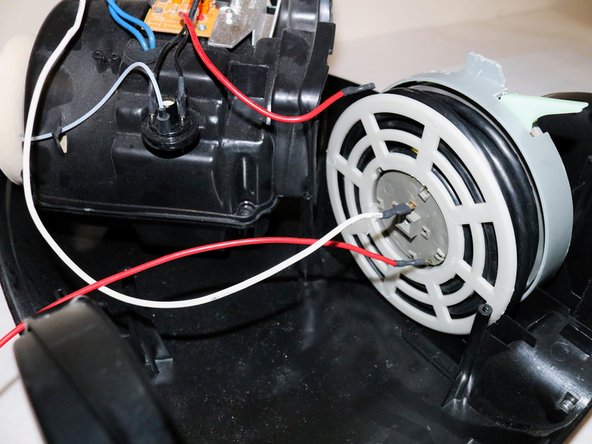
Поднимите двигатель и переместите его, чтобы получить доступ к катушке.

Открутите винт на катушке.

Снимите пластиковый круг.

Шаг 21

Bissell OptiClean Cyclonic Vacuum Motor and Circuit Board Replacement: step 21, image 1 of 1

Снимите мотор.

И все готово!

Комментировать
88 просмотров
Комментариев нет, будьте первым кто его оставит

Это интересно
No Image Гайды
0 комментариев
No Image Гайды
0 комментариев
No Image Гайды
0 комментариев