No Image

Как выполнить жесткий сброс настроек на Nintendo DS Lite

82 просмотров
12 декабря 2023

Шаг 1 Батарея

How to perform a Hard Reset on the Nintendo DS Lite, Battery: step 1, image 1 of 1

Переверните DS на обратную сторону.

Шаг 2

How to perform a Hard Reset on the Nintendo DS Lite: step 2, image 1 of 2How to perform a Hard Reset on the Nintendo DS Lite: step 2, image 2 of 2

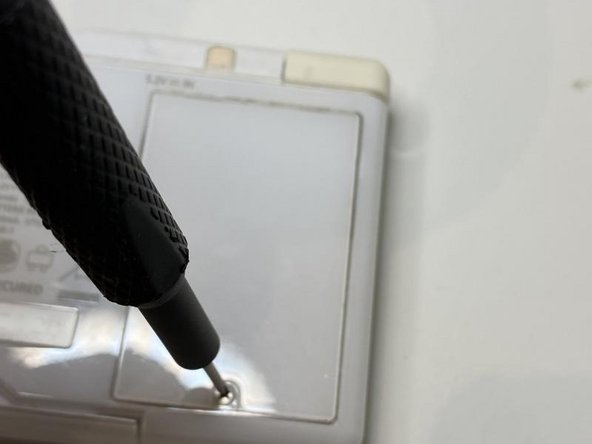
Это винт PH00,

Открутите его.

Винт остается в крышке батарейного отсека, поэтому не стоит беспокоиться о его потере.

Шаг 3 Снятие крышки

How to perform a Hard Reset on the Nintendo DS Lite, Removing the cover: step 3, image 1 of 2How to perform a Hard Reset on the Nintendo DS Lite, Removing the cover: step 3, image 2 of 2

Снимите крышку батарейного отсека.

Шаг 4 Извлечение аккумулятора

How to perform a Hard Reset on the Nintendo DS Lite, Taking out the battery: step 4, image 1 of 3How to perform a Hard Reset on the Nintendo DS Lite, Taking out the battery: step 4, image 2 of 3How to perform a Hard Reset on the Nintendo DS Lite, Taking out the battery: step 4, image 3 of 3

Подденьте край на боковой стороне аккумулятора с помощью пробки.

Шаг 5 .

How to perform a Hard Reset on the Nintendo DS Lite, .: step 5, image 1 of 1

Выньте батарею и оставьте ее на 15-30 секунд.

Шаг 6 Установка батареи

How to perform a Hard Reset on the Nintendo DS Lite, Inserting the battery: step 6, image 1 of 3How to perform a Hard Reset on the Nintendo DS Lite, Inserting the battery: step 6, image 2 of 3How to perform a Hard Reset on the Nintendo DS Lite, Inserting the battery: step 6, image 3 of 3

Вставьте батарею на место.

Убедитесь, что батарея совпадает с разъемами «+» и «-«.

Шаг 7 Закручивание крышки

How to perform a Hard Reset on the Nintendo DS Lite, Screwing in the cover: step 7, image 1 of 2How to perform a Hard Reset on the Nintendo DS Lite, Screwing in the cover: step 7, image 2 of 2

Установите крышку на место и закрутите ее.

Шаг 8 Завершение работы

How to perform a Hard Reset on the Nintendo DS Lite, Finish: step 8, image 1 of 1

Если все сделано правильно, вы должны оказаться на экране настройки, который будет выглядеть так, как если бы вы получили ds в магазине.

Вы можете удерживать A + B + X + Y + R при включении системы, и ds загрузится в картридж ds без выполнения настройки, вы можете загрузить картридж Game Pak/GBA, если удерживаете A + B + X + Y + L вместо этого.

Комментировать
82 просмотров
Комментариев нет, будьте первым кто его оставит

Это интересно
No Image Гайды
0 комментариев
No Image Гайды
0 комментариев
No Image Гайды
0 комментариев