No Image

Замена материнской платы Dell Optiplex GX620

48 просмотров
07 декабря 2023

Введение

В этом руководстве показано, как снять и заменить материнскую плату в Dell Optiplex GX620.

Шаг 1 Как отключить и разрядить питание перед ремонтом

Dell Optiplex GX620 Motherboard Replacement, How to unplug and discharge before repair: step 1, image 1 of 2Dell Optiplex GX620 Motherboard Replacement, How to unplug and discharge before repair: step 1, image 2 of 2

Выключите компьютер и отсоедините шнур питания от задней панели.

Шаг 2

Dell Optiplex GX620 Motherboard Replacement: step 2, image 1 of 2Dell Optiplex GX620 Motherboard Replacement: step 2, image 2 of 2

Нажмите и удерживайте кнопку питания около 10 секунд, затем отпустите.

Это поможет разрядить оставшуюся энергию, накопленную в конденсаторах, и вы сможете безопасно работать с внутренними компонентами.

Шаг 3 Разборка боковой панели Dell Optiplex GX620

Dell Optiplex GX620 Motherboard Replacement, Dell Optiplex GX620 Side Panel Disassembly: step 3, image 1 of 1

Когда компьютер стоит вертикально, сильно потяните за выступ на задней панели компьютера.

Когда боковая панель освободится, осторожно потяните ее в сторону от компьютера.

Если вам трудно освободить боковую панель от корпуса, возможно, вам придется потянуть за выступ немного сильнее.

Шаг 4 Теперь отсоедините кабели питания и передачи данных жестких дисков.

Dell Optiplex GX620 Motherboard Replacement, Now unplug your hard drives power and data cables.: step 4, image 1 of 3Dell Optiplex GX620 Motherboard Replacement, Now unplug your hard drives power and data cables.: step 4, image 2 of 3Dell Optiplex GX620 Motherboard Replacement, Now unplug your hard drives power and data cables.: step 4, image 3 of 3

Уберите кабели с дороги.

Питание SATA

SATA Data

Шаг 5 Отсоедините флоппи-дисковод от материнской платы и дисковода.

Dell Optiplex GX620 Motherboard Replacement, Unplug your floppy drive on the motherboard and the drive.: step 5, image 1 of 3Dell Optiplex GX620 Motherboard Replacement, Unplug your floppy drive on the motherboard and the drive.: step 5, image 2 of 3Dell Optiplex GX620 Motherboard Replacement, Unplug your floppy drive on the motherboard and the drive.: step 5, image 3 of 3

Отсоедините кабель питания

Отсоедините кабель данных

Шаг 6 Отключите вентилятор процессора.

Dell Optiplex GX620 Motherboard Replacement, Disconnect CPU fan.: step 6, image 1 of 2Dell Optiplex GX620 Motherboard Replacement, Disconnect CPU fan.: step 6, image 2 of 2

Отсоедините вентилятор, который находится на материнской плате.

Шаг 7

Dell Optiplex GX620 Motherboard Replacement: step 7, image 1 of 2Dell Optiplex GX620 Motherboard Replacement: step 7, image 2 of 2

Необходимо выкрутить два винта Phillips #2.

Эти два винта имеют пружины, которые удерживают их на месте.

Шаг 8 Настало время снять радиатор.

Dell Optiplex GX620 Motherboard Replacement, New it’s time to remove the heat sink.: step 8, image 1 of 3Dell Optiplex GX620 Motherboard Replacement, New it’s time to remove the heat sink.: step 8, image 2 of 3Dell Optiplex GX620 Motherboard Replacement, New it’s time to remove the heat sink.: step 8, image 3 of 3

Поднимите радиатор.

Шаг 9 Извлечение процессора.

Dell Optiplex GX620 Motherboard Replacement, CPU removal.: step 9, image 1 of 3Dell Optiplex GX620 Motherboard Replacement, CPU removal.: step 9, image 2 of 3Dell Optiplex GX620 Motherboard Replacement, CPU removal.: step 9, image 3 of 3

Нажмите на него и отпустите. Затем извлеките процессор.

Не забудьте нанести на процессор новую термопасту.

Шаг 10 Извлечение оперативной памяти

Dell Optiplex GX620 Motherboard Replacement, Remove the ram: step 10, image 1 of 2Dell Optiplex GX620 Motherboard Replacement, Remove the ram: step 10, image 2 of 2

Нажмите на язычки вниз.

Вытащите карты памяти.

Шаг 11 Извлеките кабель DVD

Dell Optiplex GX620 Motherboard Replacement, Remove the DVD cable: step 11, image 1 of 3Dell Optiplex GX620 Motherboard Replacement, Remove the DVD cable: step 11, image 2 of 3Dell Optiplex GX620 Motherboard Replacement, Remove the DVD cable: step 11, image 3 of 3

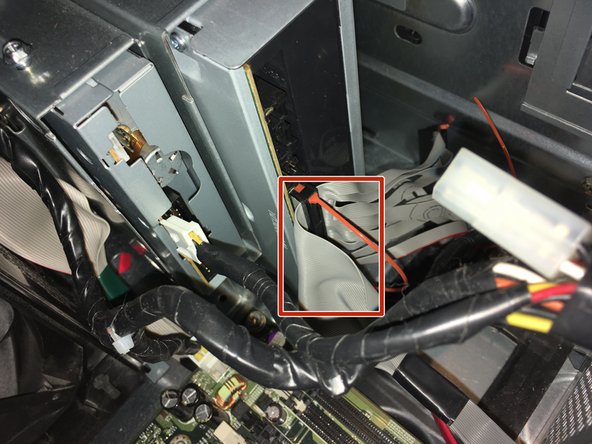
Отсоедините два кабеля от DVD-привода.

Шаг 12

Dell Optiplex GX620 Motherboard Replacement: step 12, image 1 of 2Dell Optiplex GX620 Motherboard Replacement: step 12, image 2 of 2

Отсоедините кабель питания от DVD-привода.

Шаг 13 Отключите питание процессора

Dell Optiplex GX620 Motherboard Replacement, Remove the CPU power: step 13, image 1 of 1

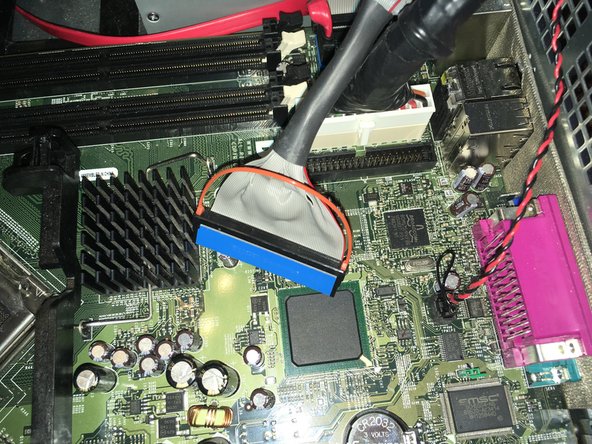
Отсоедините кабель питания процессора.

Шаг 14 Отсоедините три кабеля

Dell Optiplex GX620 Motherboard Replacement, Remove the three cables: step 14, image 1 of 2Dell Optiplex GX620 Motherboard Replacement, Remove the three cables: step 14, image 2 of 2

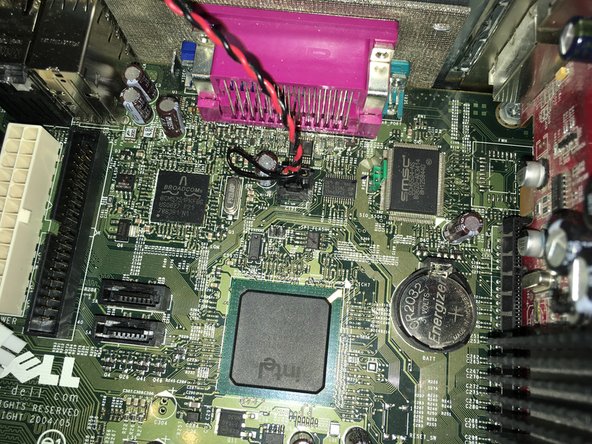
Отсоедините три кабеля.

Шаг 15 Извлеките видеокарту

Dell Optiplex GX620 Motherboard Replacement, Remove the graphics card: step 15, image 1 of 3Dell Optiplex GX620 Motherboard Replacement, Remove the graphics card: step 15, image 2 of 3Dell Optiplex GX620 Motherboard Replacement, Remove the graphics card: step 15, image 3 of 3

Нажмите на выступ, чтобы освободить защелку.

Нажмите на выступ и вытащите видеокарту.

Шаг 16 Открутите винты материнской платы

Dell Optiplex GX620 Motherboard Replacement, Remove the motherboard screws: step 16, image 1 of 2Dell Optiplex GX620 Motherboard Replacement, Remove the motherboard screws: step 16, image 2 of 2

Выкрутите шесть винтов Philips №2.

Выкрутите два зеленых винта Philips №2.

Шаг 17 Извлеките материнскую плату

Dell Optiplex GX620 Motherboard Replacement, Remove the motherboard: step 17, image 1 of 3Dell Optiplex GX620 Motherboard Replacement, Remove the motherboard: step 17, image 2 of 3Dell Optiplex GX620 Motherboard Replacement, Remove the motherboard: step 17, image 3 of 3

Аккуратно вытащите материнскую плату.

Комментировать
48 просмотров
Комментариев нет, будьте первым кто его оставит

Это интересно
No Image Гайды
0 комментариев
No Image Гайды
0 комментариев
No Image Гайды
0 комментариев