No Image

Замена корпуса пульта Nintendo Wii

99 просмотров
12 декабря 2023

Введение

В этом руководстве показано, как заменить оболочку пульта Wii. Существует множество причин для смены корпуса. Например

Давайте приступим к описанию!

Шаг 1 Снятие ремешка (необязательно, но рекомендуется).

Nintendo Wii Remote Shell Replacement, Removing the strap (Optional, but recommended.): step 1, image 1 of 1

Снимите защитный ремешок, чтобы он не мешал нам.

Шаг 2 Извлечение батарей

Nintendo Wii Remote Shell Replacement, Removing the batteries: step 2, image 1 of 2Nintendo Wii Remote Shell Replacement, Removing the batteries: step 2, image 2 of 2

Извлеките батарею, подцепив ее ногтем.

Шаг 3 Откручивание винтов

Nintendo Wii Remote Shell Replacement, Removing the screws: step 3, image 1 of 2Nintendo Wii Remote Shell Replacement, Removing the screws: step 3, image 2 of 2

Здесь начинается разборка, возьмите отвертку Y1 и открутите следующие винты.

Шаг 4 Проникните внутрь

Аккуратно снимите переднюю крышку

Шаг 5 Извлечение кнопок

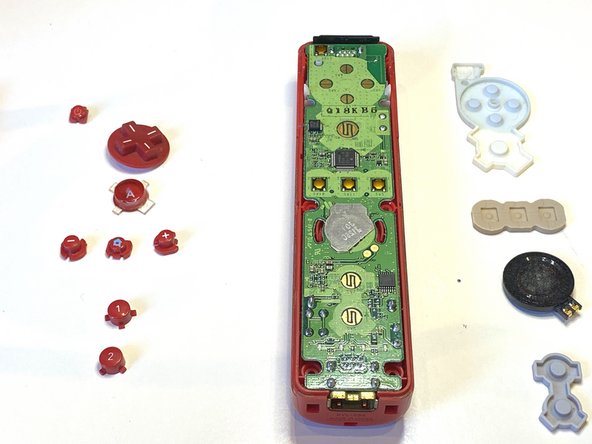
Nintendo Wii Remote Shell Replacement, Removing the buttons: step 5, image 1 of 2Nintendo Wii Remote Shell Replacement, Removing the buttons: step 5, image 2 of 2

Отсоедините все кнопки на материнской плате

Шаг 6 Снятие резины

Nintendo Wii Remote Shell Replacement, Removing Rubber: step 6, image 1 of 2Nintendo Wii Remote Shell Replacement, Removing Rubber: step 6, image 2 of 2

Снимите всю резину.

Шаг 7 Извлечение материнской платы

Nintendo Wii Remote Shell Replacement, Removing the Motherboard: step 7, image 1 of 3Nintendo Wii Remote Shell Replacement, Removing the Motherboard: step 7, image 2 of 3Nintendo Wii Remote Shell Replacement, Removing the Motherboard: step 7, image 3 of 3

Выньте материнскую плату

Шаг 8 Извлечение кнопки B

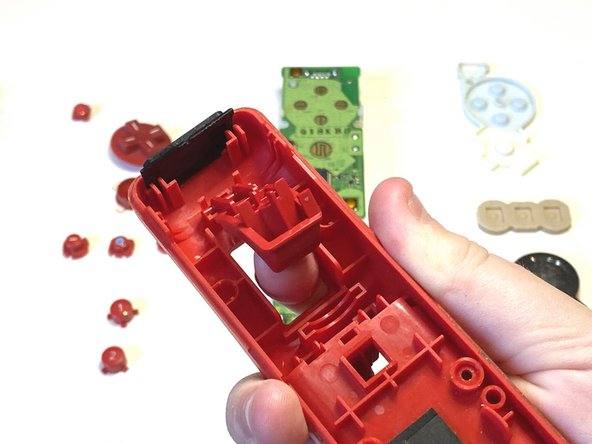
Nintendo Wii Remote Shell Replacement, Taking out the B Button: step 8, image 1 of 3Nintendo Wii Remote Shell Replacement, Taking out the B Button: step 8, image 2 of 3Nintendo Wii Remote Shell Replacement, Taking out the B Button: step 8, image 3 of 3

Извлеките кнопку B

Шаг 9 Извлечение кнопки B

Nintendo Wii Remote Shell Replacement, Removing the B Button: step 9, image 1 of 2Nintendo Wii Remote Shell Replacement, Removing the B Button: step 9, image 2 of 2

Извлеките кнопку B

Шаг 10 Получение новой оболочки

Nintendo Wii Remote Shell Replacement, Getting new shell: step 10, image 1 of 1

Возьмите новую оболочку

Шаг 11 Вставка компонентов

Nintendo Wii Remote Shell Replacement, Inserting the components: step 11, image 1 of 2Nintendo Wii Remote Shell Replacement, Inserting the components: step 11, image 2 of 2

Вставьте все кнопки

Убедитесь, что они правильно вставлены и нажимаются.

Шаг 12 Вставка резины

Nintendo Wii Remote Shell Replacement, Inserting Rubber: step 12, image 1 of 2Nintendo Wii Remote Shell Replacement, Inserting Rubber: step 12, image 2 of 2

Наденьте резину на все кнопки.

Шаг 13 Вставка кнопки B

Подключите кнопку B

Шаг 14 Закрытие пульта

Аккуратно установите заднюю крышку на пульт wii

Шаг 15 Прикручивание

Nintendo Wii Remote Shell Replacement, Screwing In: step 15, image 1 of 1

Вкрутите винты Y1 в следующие места

Комментировать
99 просмотров
Комментариев нет, будьте первым кто его оставит

Это интересно
No Image Гайды
0 комментариев
No Image Гайды
0 комментариев
No Image Гайды
0 комментариев