No Image

Замена датчика отпечатков пальцев в Motorola Moto E6 Plus

СОДЕРЖАНИЕ
61 просмотров
10 декабря 2023

Введение

Следуйте этому руководству, чтобы извлечь или заменить датчик отпечатков пальцев в Motorola Moto E6 Plus.

Перед началом работы загрузите приложение Rescue and Smart Assistant, чтобы создать резервную копию устройства и определить, является ли проблема программной или аппаратной.

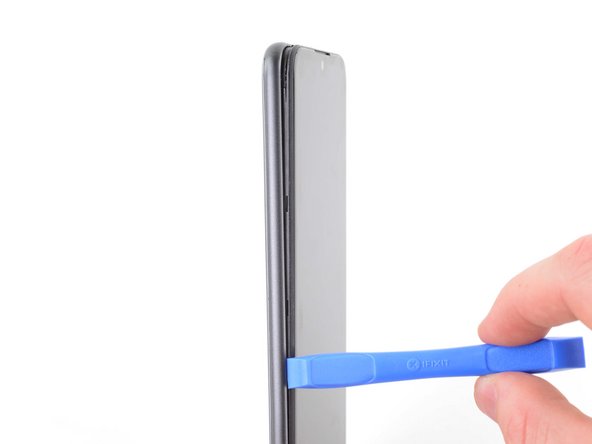
Шаг 1 Отстегните заднюю крышку

Motorola Moto E6 Plus Fingerprint Sensor Replacement, Unclip the back cover: step 1, image 1 of 2Motorola Moto E6 Plus Fingerprint Sensor Replacement, Unclip the back cover: step 1, image 2 of 2

С помощью инструмента для открывания или ногтя подденьте заднюю крышку и отделите ее от рамки, используя выемку в правом нижнем углу.

Шаг 2 Отсоедините правый край

Motorola Moto E6 Plus Fingerprint Sensor Replacement, Unclip the right edge: step 2, image 1 of 3Motorola Moto E6 Plus Fingerprint Sensor Replacement, Unclip the right edge: step 2, image 2 of 3Motorola Moto E6 Plus Fingerprint Sensor Replacement, Unclip the right edge: step 2, image 3 of 3

С помощью инструмента для открывания или ногтя освободите зажимы на правом краю, сдвинув их вверх и обогнув правый верхний угол.

Шаг 3 Отстегните верхний край

Motorola Moto E6 Plus Fingerprint Sensor Replacement, Unclip the top edge: step 3, image 1 of 2Motorola Moto E6 Plus Fingerprint Sensor Replacement, Unclip the top edge: step 3, image 2 of 2

Продолжайте скользить инструментом для открывания или ногтем по верхнему краю, чтобы освободить зажимы, крепящие заднюю крышку к рамке.

Шаг 4 Отстегните левый край

Motorola Moto E6 Plus Fingerprint Sensor Replacement, Unclip the left edge: step 4, image 1 of 2Motorola Moto E6 Plus Fingerprint Sensor Replacement, Unclip the left edge: step 4, image 2 of 2

Продолжайте скользить инструментом для открывания или ногтем по левому краю, чтобы освободить зажимы.

Шаг 5 Снимите заднюю крышку

Motorola Moto E6 Plus Fingerprint Sensor Replacement, Remove the back cover: step 5, image 1 of 3Motorola Moto E6 Plus Fingerprint Sensor Replacement, Remove the back cover: step 5, image 2 of 3Motorola Moto E6 Plus Fingerprint Sensor Replacement, Remove the back cover: step 5, image 3 of 3

Снимите заднюю крышку.

Шаг 6 Извлеките SIM- и SD-карты

Motorola Moto E6 Plus Fingerprint Sensor Replacement, Remove the SIM and SD cards: step 6, image 1 of 3Motorola Moto E6 Plus Fingerprint Sensor Replacement, Remove the SIM and SD cards: step 6, image 2 of 3Motorola Moto E6 Plus Fingerprint Sensor Replacement, Remove the SIM and SD cards: step 6, image 3 of 3

С помощью лопатки или ногтя извлеките карту Micro SD, карту Micro SIM и карту Nano SIM.

Шаг 7 Снимите белую наклейку

Motorola Moto E6 Plus Fingerprint Sensor Replacement, Remove the white sticker: step 7, image 1 of 2Motorola Moto E6 Plus Fingerprint Sensor Replacement, Remove the white sticker: step 7, image 2 of 2

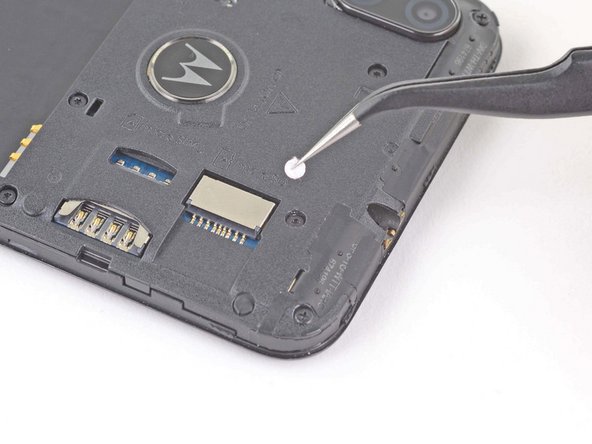
С помощью пинцета снимите наклейку, закрывающую винт под портом аудиоразъема.

Шаг 8 Выкрутите винты

Motorola Moto E6 Plus Fingerprint Sensor Replacement, Remove the screws: step 8, image 1 of 1

С помощью отвертки Torx T3 выкрутите пять винтов длиной 3,6 мм, крепящих крышку материнской платы к рамке.

Используйте крестовую отвертку, чтобы выкрутить два винта длиной 3,1 мм.

Шаг 9 Отклейте наклейку с кнопками

Motorola Moto E6 Plus Fingerprint Sensor Replacement, Peel back the button sticker: step 9, image 1 of 2Motorola Moto E6 Plus Fingerprint Sensor Replacement, Peel back the button sticker: step 9, image 2 of 2

Пинцетом отклейте наклейку, закрывающую кнопки громкости.

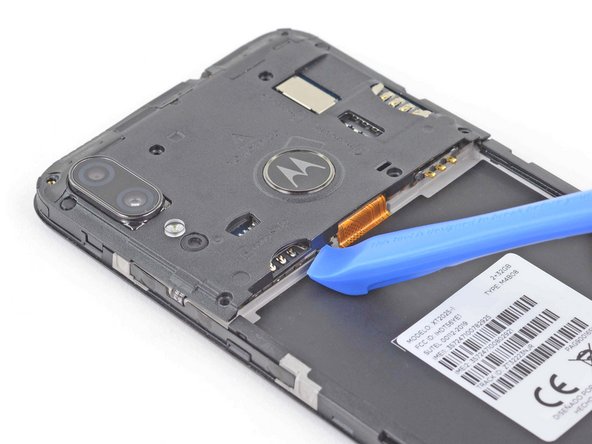
Шаг 10 Подденьте крышку материнской платы

Motorola Moto E6 Plus Fingerprint Sensor Replacement, Pry up the motherboard cover: step 10, image 1 of 3Motorola Moto E6 Plus Fingerprint Sensor Replacement, Pry up the motherboard cover: step 10, image 2 of 3Motorola Moto E6 Plus Fingerprint Sensor Replacement, Pry up the motherboard cover: step 10, image 3 of 3

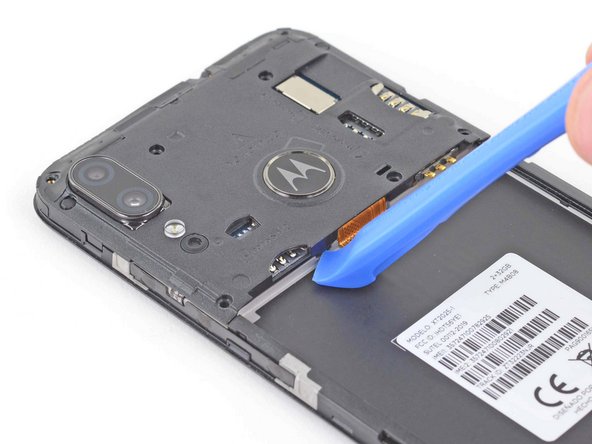
Используйте инструмент для открывания, чтобы освободить зажим слева от гибкого кабеля материнской платы.

Шаг 11

Motorola Moto E6 Plus Fingerprint Sensor Replacement: step 11, image 1 of 2Motorola Moto E6 Plus Fingerprint Sensor Replacement: step 11, image 2 of 2

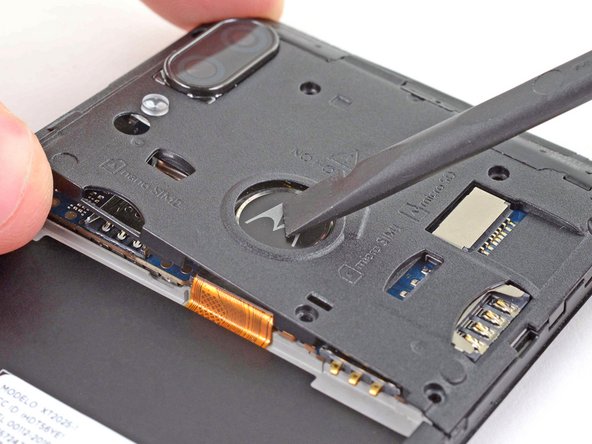
Подденьте левый край крышки материнской платы шилом, чтобы ослабить зажимы.

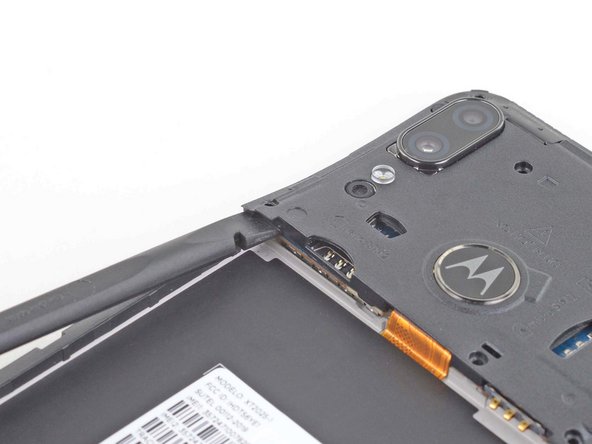
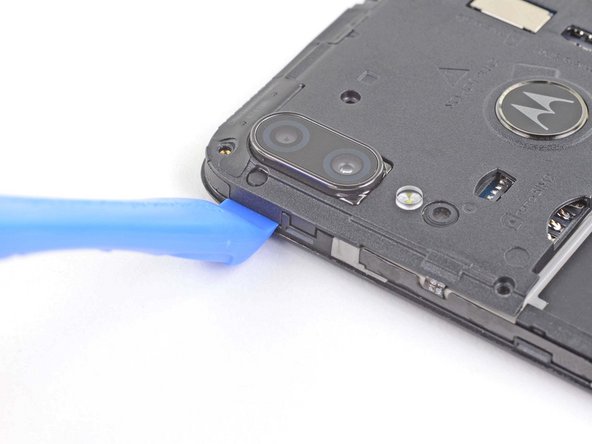
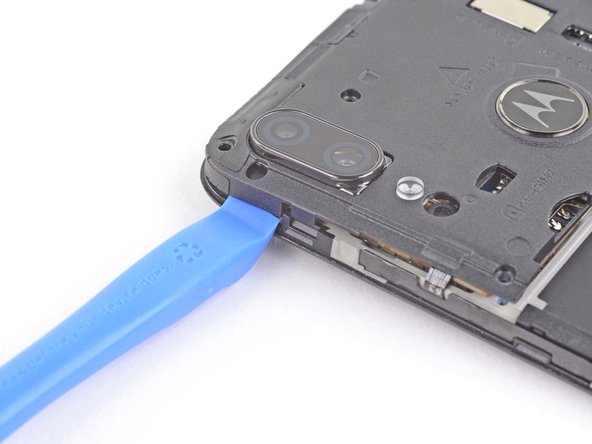
Шаг 12 Подденьте крышку материнской платы

Motorola Moto E6 Plus Fingerprint Sensor Replacement, Pry up the motherboard cover: step 12, image 1 of 3Motorola Moto E6 Plus Fingerprint Sensor Replacement, Pry up the motherboard cover: step 12, image 2 of 3Motorola Moto E6 Plus Fingerprint Sensor Replacement, Pry up the motherboard cover: step 12, image 3 of 3

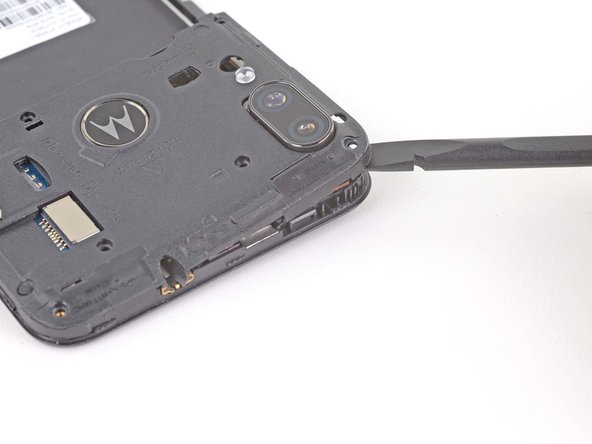
Используйте инструмент для открывания, чтобы освободить зажим рядом с задними камерами.

Шаг 13

Motorola Moto E6 Plus Fingerprint Sensor Replacement: step 13, image 1 of 3Motorola Moto E6 Plus Fingerprint Sensor Replacement: step 13, image 2 of 3Motorola Moto E6 Plus Fingerprint Sensor Replacement: step 13, image 3 of 3

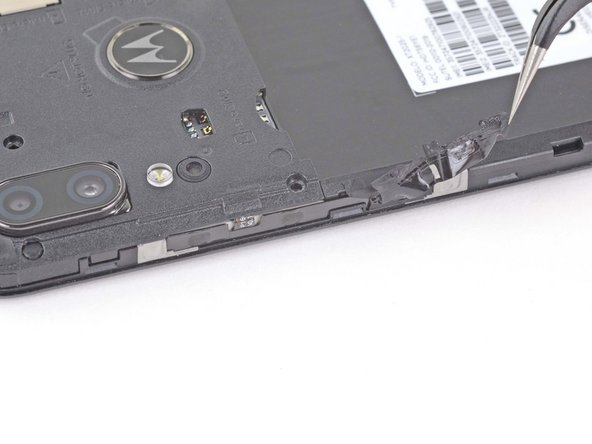
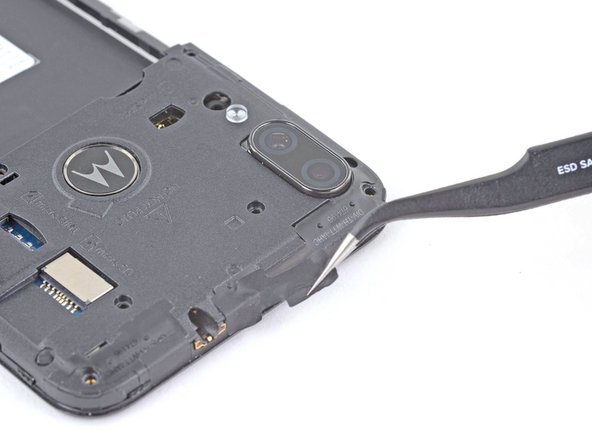
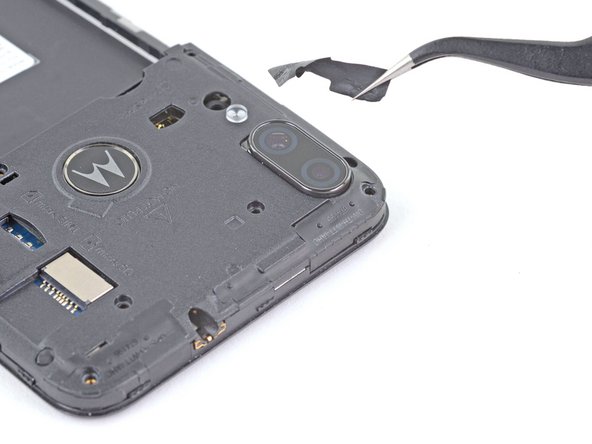
Пинцетом отклейте наклейку на верхнем краю крышки материнской платы.

Шаг 14 Подденьте крышку материнской платы

Motorola Moto E6 Plus Fingerprint Sensor Replacement, Pry up the motherboard cover: step 14, image 1 of 2Motorola Moto E6 Plus Fingerprint Sensor Replacement, Pry up the motherboard cover: step 14, image 2 of 2

Подденьте левый край крышки материнской платы с помощью пробки, чтобы ослабить фиксаторы.

Шаг 15 Извлеките датчик отпечатков пальцев

Motorola Moto E6 Plus Fingerprint Sensor Replacement, Dislodge the fingerprint sensor: step 15, image 1 of 2Motorola Moto E6 Plus Fingerprint Sensor Replacement, Dislodge the fingerprint sensor: step 15, image 2 of 2

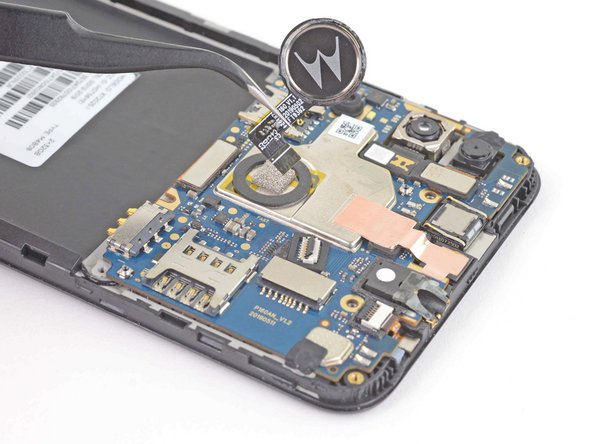
Подденьте датчик отпечатков пальцев и снимите его с крышки материнской платы.

Датчик отпечатков пальцев прикреплен к нижней стороне крышки материнской платы с помощью небольшого количества клея.

Шаг 16 Снимите крышку системной платы

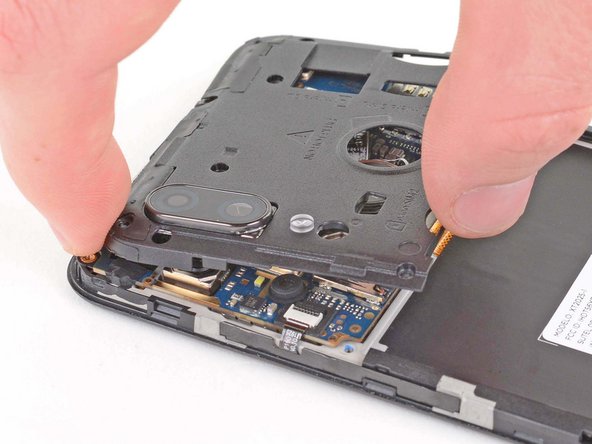
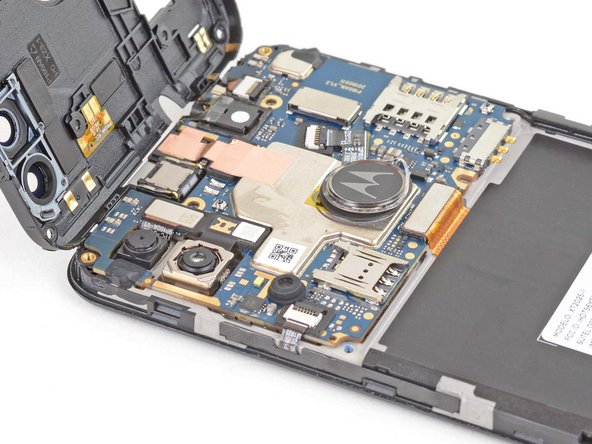
Motorola Moto E6 Plus Fingerprint Sensor Replacement, Remove the motherboard cover: step 16, image 1 of 3Motorola Moto E6 Plus Fingerprint Sensor Replacement, Remove the motherboard cover: step 16, image 2 of 3Motorola Moto E6 Plus Fingerprint Sensor Replacement, Remove the motherboard cover: step 16, image 3 of 3

Пальцами поверните крышку материнской платы против часовой стрелки, чтобы освободить зажимы, фиксирующие крышку материнской платы.

Шаг 17

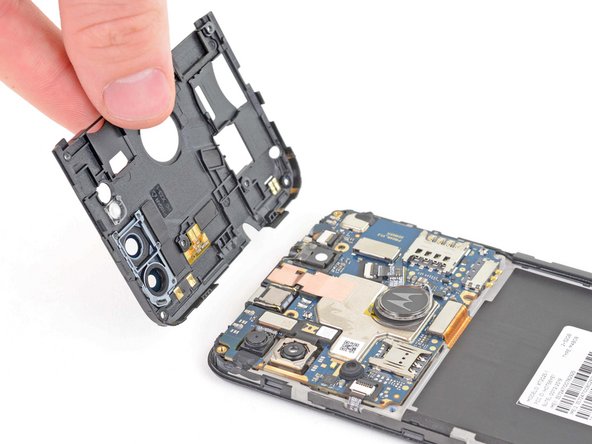
Motorola Moto E6 Plus Fingerprint Sensor Replacement: step 17, image 1 of 2Motorola Moto E6 Plus Fingerprint Sensor Replacement: step 17, image 2 of 2

Снимите крышку системной платы.

Шаг 18 Извлечение датчика отпечатков пальцев

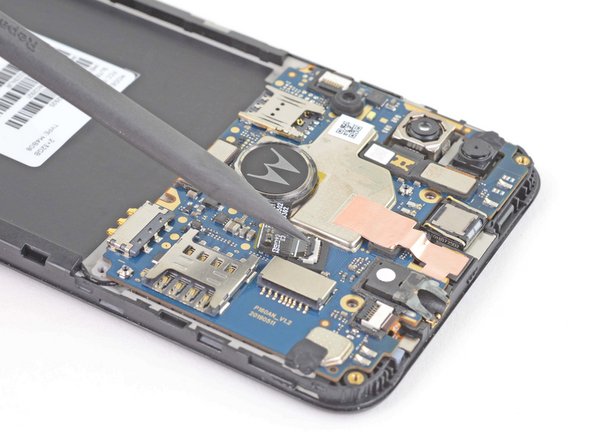
Motorola Moto E6 Plus Fingerprint Sensor Replacement, Remove the fingerprint sensor: step 18, image 1 of 3Motorola Moto E6 Plus Fingerprint Sensor Replacement, Remove the fingerprint sensor: step 18, image 2 of 3Motorola Moto E6 Plus Fingerprint Sensor Replacement, Remove the fingerprint sensor: step 18, image 3 of 3

Подденьте маленькую откидную защелку на разъеме ZIF датчика отпечатков пальцев с помощью шила, инструмента для открывания или ногтя.

Потяните ленточный кабель датчика отпечатков пальцев прямо из разъема, чтобы извлечь его.

Извлеките датчик отпечатков пальцев.

Комментировать
61 просмотров
Комментариев нет, будьте первым кто его оставит

Это интересно
No Image Гайды
0 комментариев
No Image Гайды
0 комментариев
No Image Гайды
0 комментариев