No Image

Packard Bell ms-Hera c Разборка

112 просмотров
09 декабря 2023

Шаг 1 Открутите крышку

Packard Bell ms-Hera c Disassembly, Unscrew the lid: step 1, image 1 of 3Packard Bell ms-Hera c Disassembly, Unscrew the lid: step 1, image 2 of 3Packard Bell ms-Hera c Disassembly, Unscrew the lid: step 1, image 3 of 3

Извлеките батарею.

Крестовой отверткой открутите винты с красной маркировкой.

Извлеките устройство чтения DVD-дисков.

Шаг 2 Отсоедините клавиатуру

Packard Bell ms-Hera c Disassembly, Disconnect the keyboard: step 2, image 1 of 3Packard Bell ms-Hera c Disassembly, Disconnect the keyboard: step 2, image 2 of 3Packard Bell ms-Hera c Disassembly, Disconnect the keyboard: step 2, image 3 of 3

Надавите на отмеченные красным места, чтобы освободить клавиатуру.

Отсоедините разъем клавиатуры.

Шаг 3 Отсоедините кабели

Packard Bell ms-Hera c Disassembly, Unplug the cables: step 3, image 1 of 3Packard Bell ms-Hera c Disassembly, Unplug the cables: step 3, image 2 of 3Packard Bell ms-Hera c Disassembly, Unplug the cables: step 3, image 3 of 3

Отсоедините 3 разъема на материнской плате

Выкрутите 2 винта, удерживающие дисплей на месте

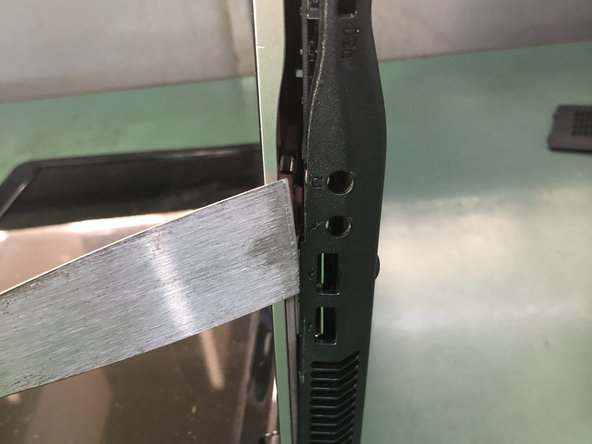
С помощью тонкого инструмента подденьте заднюю крышку ноутбука сбоку

Шаг 4 Открутите материнскую плату

Packard Bell ms-Hera c Disassembly, Unscrew the motherboard: step 4, image 1 of 3Packard Bell ms-Hera c Disassembly, Unscrew the motherboard: step 4, image 2 of 3Packard Bell ms-Hera c Disassembly, Unscrew the motherboard: step 4, image 3 of 3

Снимите заднюю крышку.

Извлеките жесткий диск.

Открутите винты, удерживающие материнскую плату.

Шаг 5 Снимите дисплей

Packard Bell ms-Hera c Disassembly, Remove the display: step 5, image 1 of 3Packard Bell ms-Hera c Disassembly, Remove the display: step 5, image 2 of 3Packard Bell ms-Hera c Disassembly, Remove the display: step 5, image 3 of 3

Выкрутите отмеченные винты и отсоедините разъемы.

Отсоедините разъем дисплея.

Извлеките дисплей.

Шаг 6 Снимите радиатор

Packard Bell ms-Hera c Disassembly, Remove the heatsink: step 6, image 1 of 3Packard Bell ms-Hera c Disassembly, Remove the heatsink: step 6, image 2 of 3Packard Bell ms-Hera c Disassembly, Remove the heatsink: step 6, image 3 of 3

Снимите вентилятор охлаждения.

Снимите радиатор.

Открутите винты на разъеме.

Шаг 7 Извлеките материнскую плату

Packard Bell ms-Hera c Disassembly, Remove the motherboard: step 7, image 1 of 2Packard Bell ms-Hera c Disassembly, Remove the motherboard: step 7, image 2 of 2

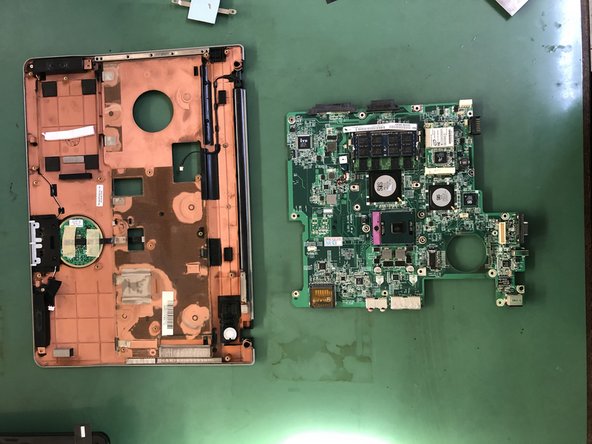
Открутите винты, чтобы снять материнскую плату.

Комментировать
112 просмотров
Комментариев нет, будьте первым кто его оставит

Это интересно
No Image Гайды
0 комментариев
No Image Гайды
0 комментариев
No Image Гайды
0 комментариев